
Session context, signed sign-in, and advanced Portal security
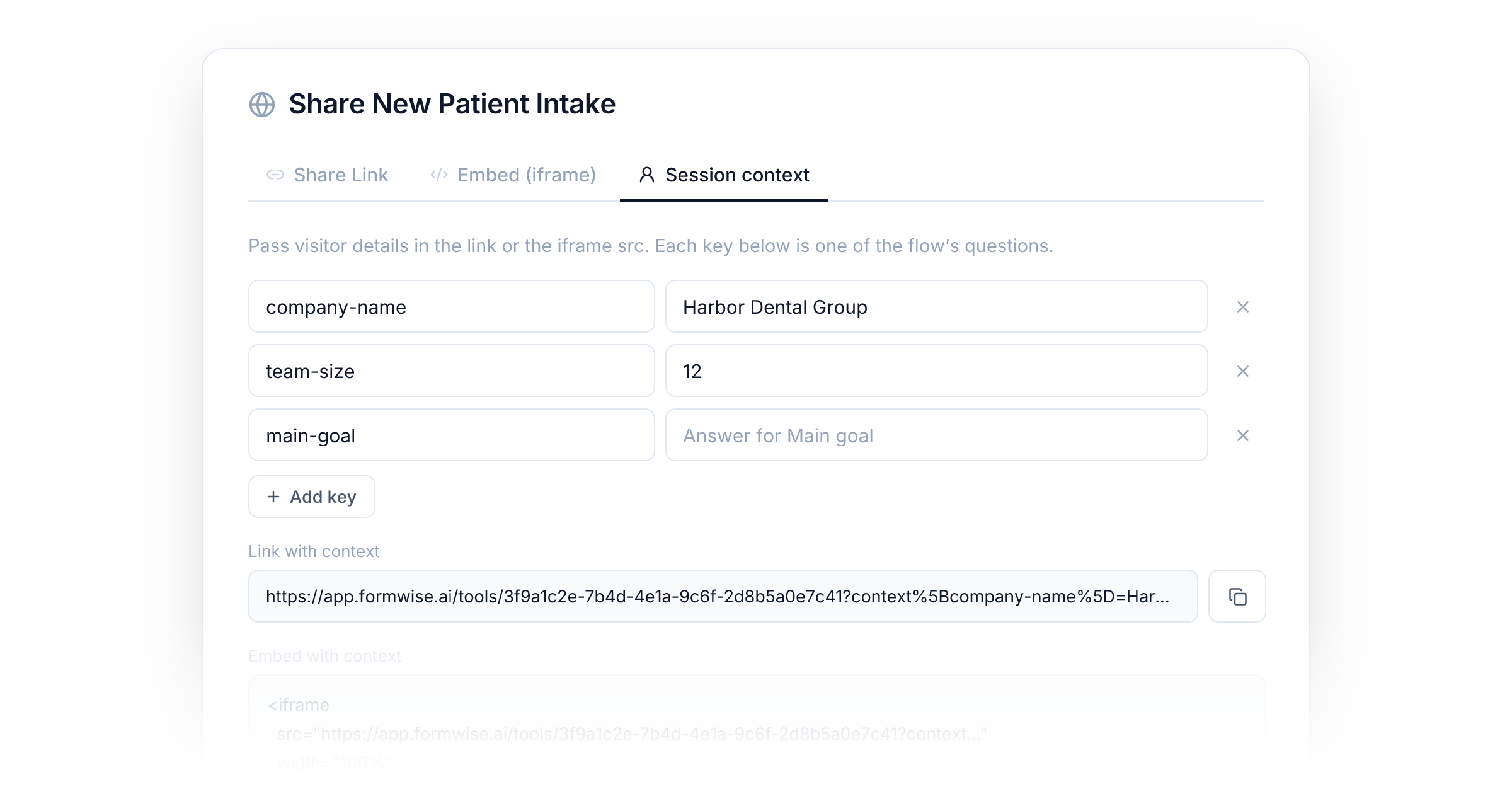
Picture a customer who is logged in to your site. They open the Flow you embedded on their dashboard, and the first thing it asks is their company name. Your site knew the answer. It just had no way to say so.
Now it does. Session context lets the page or link that opens one of your assets pass along what it already knows about the visitor: a name, a plan, an account id, an order number. The visitor skips the questions your site already answered, and the AI starts the conversation knowing who it is talking to.
Pass what your site already knows
Turn on Session context in the settings of a Flow, Agent, App, Suite, or Portal. It is off for every asset until you do. Once it is on, the share dialog gains a Session context tab. Add your keys there and copy the finished link or embed code:
?context[company-name]=Harbor%20Dental&context[plan]=pro
For a Flow, the tab starts with one row per question. A value whose key
matches a question fills in that answer, so the visitor is never asked it.
Everything else becomes background for the AI, described as details about
the visitor and never as instructions. Agents and Apps have no form, so
every value lands there. Any node can also read a value directly with
{{context.company-name}}.
Suites and Portals act as a gate for everything inside them. A Portal with Session context off blocks it for every Flow and Agent opened through it, and every level in the chain has to allow it before a value gets through.
Links are easy to share, but they end up in browser history and server
logs. When you embed an asset, your page can pass the values itself
instead: set window.AIContextConfig and load the embed script, and the
values never touch the address bar. Only pages on the asset's embedding
allowlist can send them.
Sign what your site vouches for
Anyone holding a link can edit it, so plain session context is treated as something the visitor told you. When your site knows a fact for certain, sign it. Generate a secret in Settings, under API, in the Session context signing card. Then hash the values with HMAC-SHA256 on your server and pass the signature along with them.
A valid signature changes three things:
- The AI is told the values are facts confirmed by your site.
{{context.verified}}becomes true, so a Condition node can branch on it before looking up an account or spending credits, and a Send Webhook receiver can checksessionContextVerified.- With Require a signature turned on, unsigned values are dropped before the run, for every asset in your organization.
Advanced security for Portals
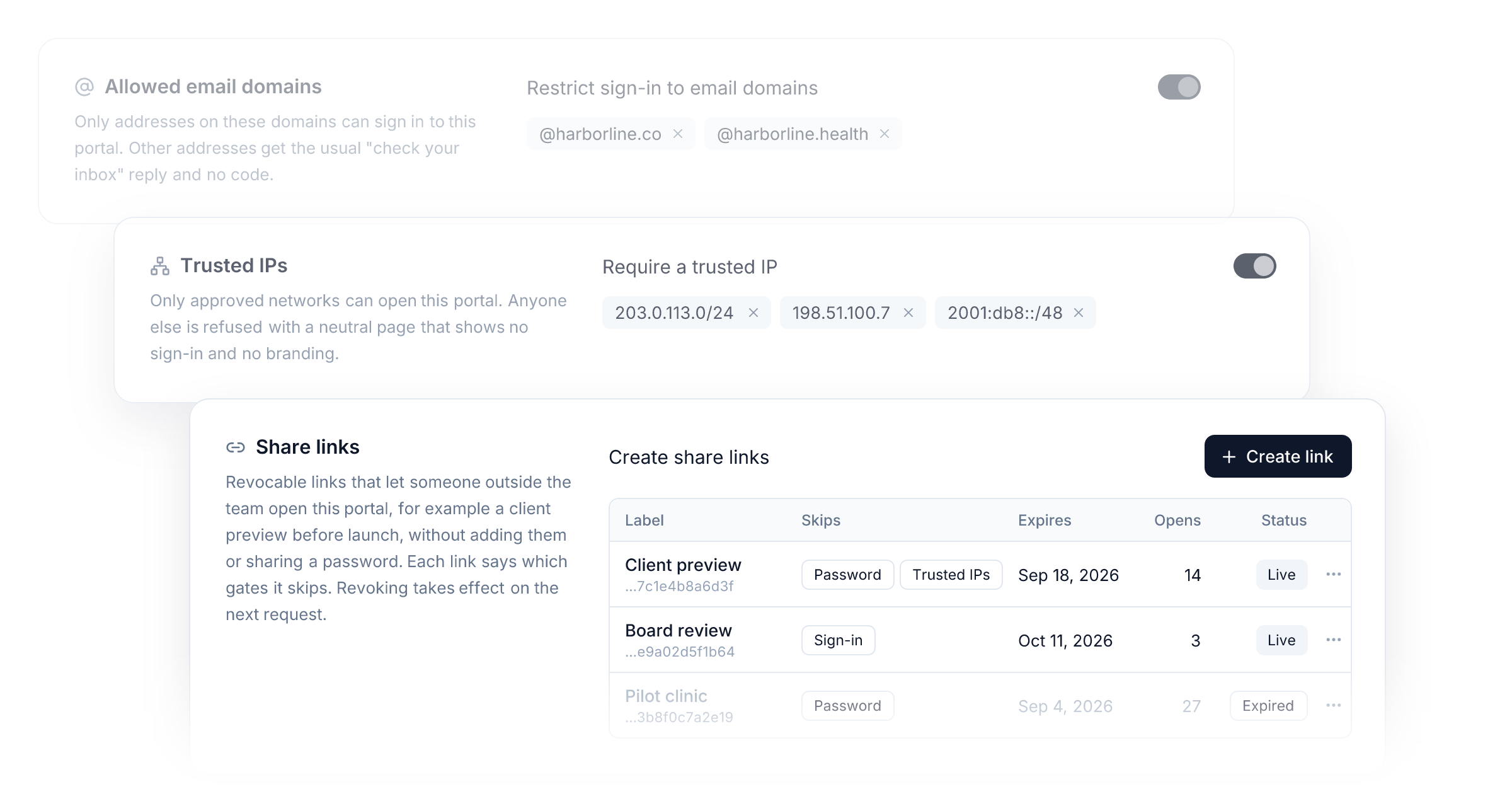
A Portal's Access page has a new Advanced Security Settings section with extra gates in front of the door. Each one is off until you turn it on.
- Allowed email domains. Only addresses on the domains you list can
sign in, for example
@harborline.co. Anyone else gets the usual "check your inbox" reply and no code, so the list never gives itself away. Domains match exactly, so list each sub-domain on its own. - Password. Visitors enter a shared password before the Portal loads. It is a gate, not an identity: visitors stay anonymous and still sign in afterwards when sign-in is required. Changing the password signs everyone out of it.
- Trusted IPs. Only the networks you list can open the Portal or call its API, up to 20 IPv4 or IPv6 addresses or ranges. Anyone else sees a neutral page with no sign-in and no branding. The card shows your current IP and warns you before you lock your own network out.
- Share links. Revocable links for someone outside your team, like a client preview before launch. You choose which gates each link skips (the password, trusted IPs, or sign-in) and when it expires, and the table counts how often it was opened. Revoking or regenerating a link takes effect on the very next request. Sign-in cannot be skipped while the Portal sells a paid plan.
Workspace members skip the password and trusted IP checks, so you can always preview your own Portal. None of these gates identify a visitor or hand out access. They decide who reaches the door, and your groups and plans still decide what is behind it.
Allowed email domains, password protection, trusted IPs, and share links are available on the Agency plan.
Signed sign-in for Portals
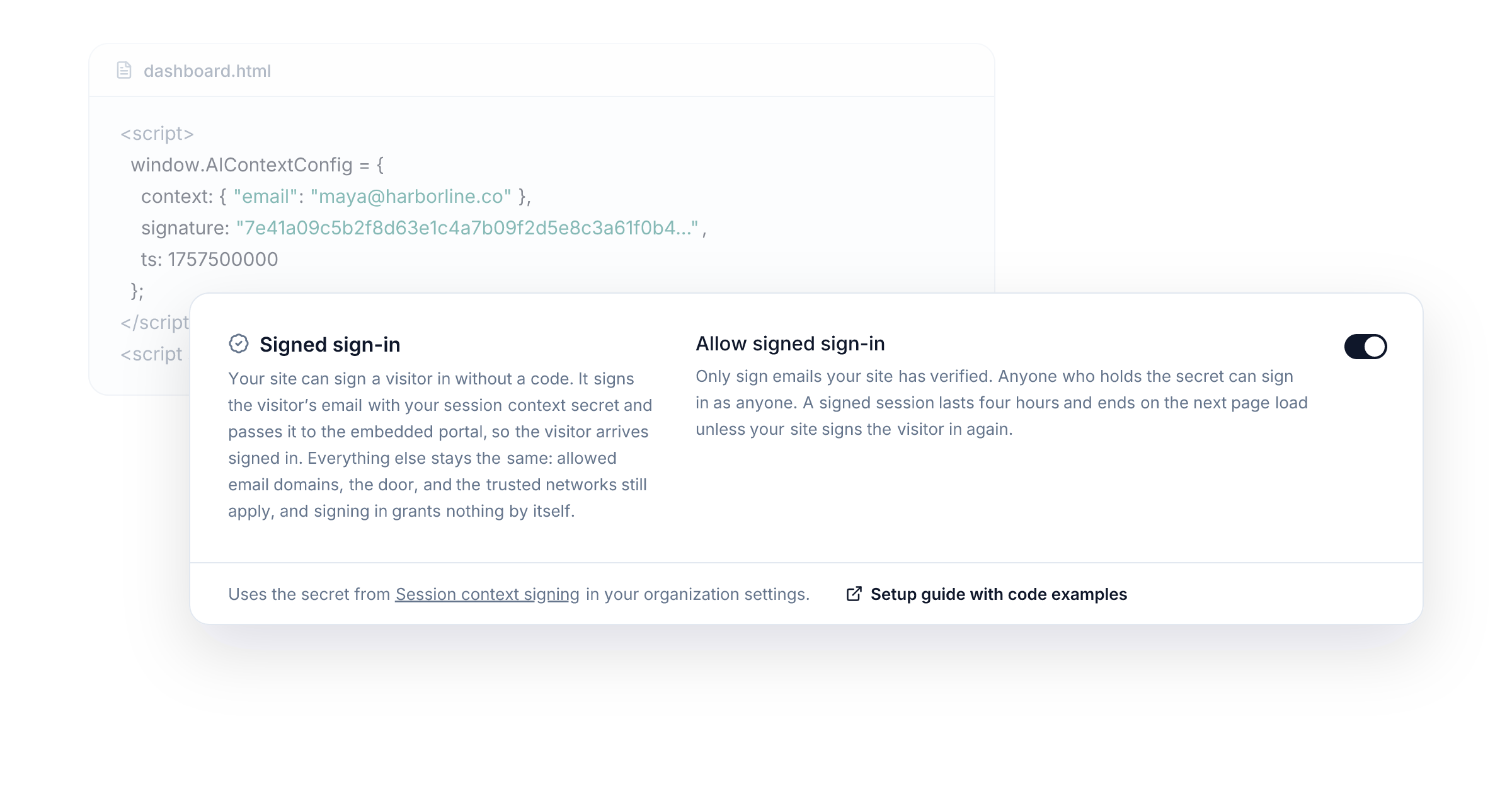
Put a Portal behind your own customer login and the one-time code step is
redundant, because your site has already verified who the visitor is. Add
email to the signed context, turn on Allow signed sign-in in the same
Advanced Security Settings section, and the visitor arrives signed in. No
code, no second login.
It replaces the code step and nothing else. Allowed email domains, trusted IPs, and the door still apply, and signing in grants nothing by itself. A visitor who signed in with a code last month and arrives signed today is the same person, with the same conversations, plans, and credits.
Signed sessions are built so that a copied signature is worth very little:
- A signature is accepted for ten minutes from its timestamp.
- The session lasts four hours and starts again on every page load, as long as your page keeps signing the visitor in.
- It is off for every Portal until you turn it on, so a leaked secret cannot sign anyone in where you did not intend.
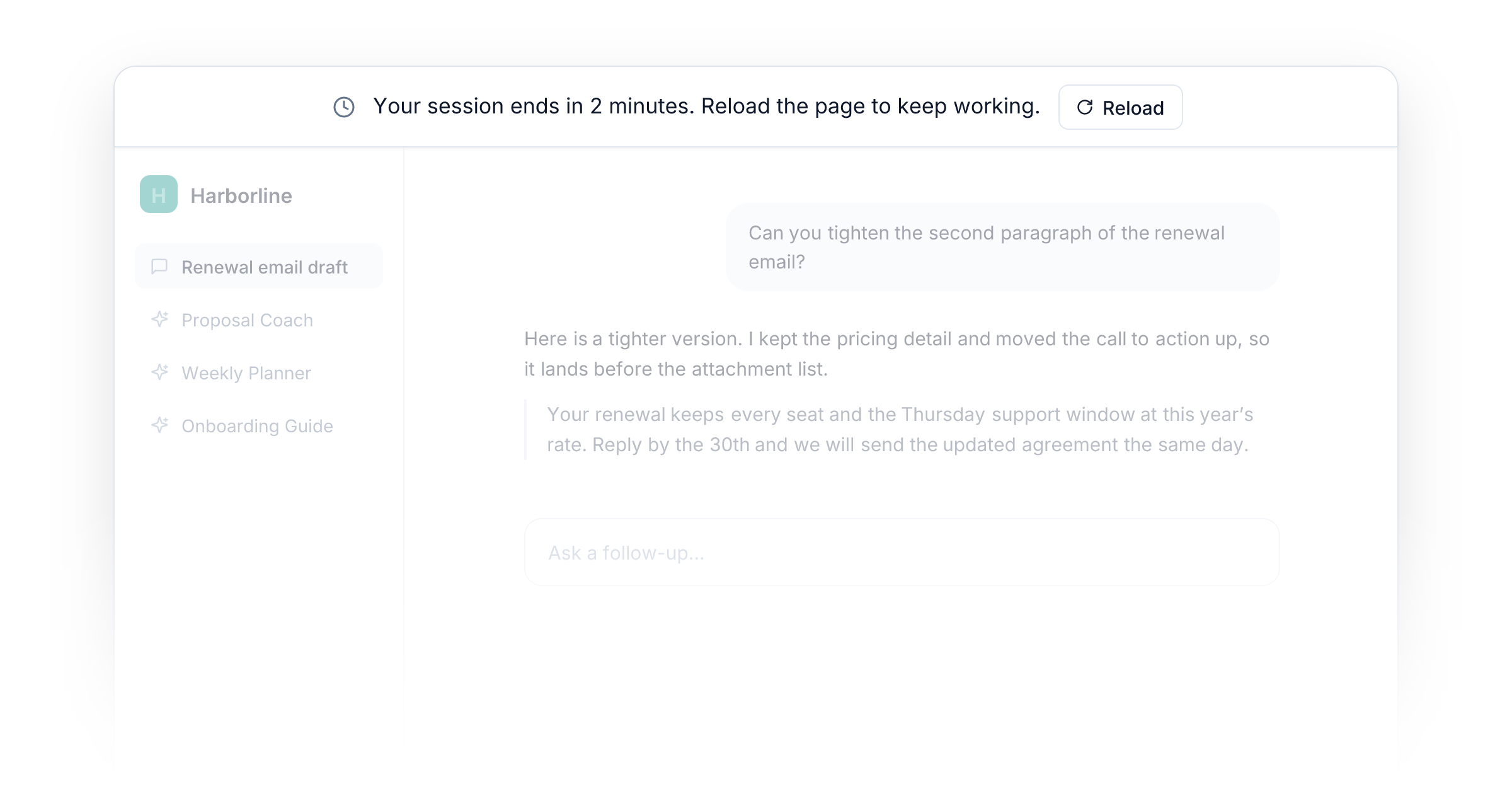
When a signed session is about to end, the Portal says so two minutes ahead with a slim bar and a Reload button. Reload asks your page to reload itself, your server signs a fresh session, and the visitor is back where they left off.
The full setup, with examples you can verify in Node.js, Python, and PHP, is in the docs for session context and signed sign-in.
Improvements
- Portals: On a Portal without a Storefront, an email that is not admitted is refused with "Invalid login." before any code is sent, and repeated refusals are rate limited.
- Embeds: A new embed script passes session context from your page, resizes the iframe to the height the asset reports, and reloads your page when a signed session ends.
- Custom domains: The embed script loads from your own domain and carries no product branding, in the script or in the messages it exchanges.
- Embeds: Flows, Agents, and Apps embedded on their own can now be limited to the sites you list, as Suites and Portals already could.
- Webhooks: Send Webhook can include the session context in its payload, with
sessionContextVerifiedset when the context was signed.
New integrations33
TikTok Ads
Strale
GetResponse
Twitch
Braze
Higgsfield MCP
Clio Manage
ScrapeCreators
Vimeo
AccuWeather
Magic Hour
The Companies API
Archive.org
Tripo3D
PDF Blocks
Blitz API
Serper
Tailscale
Jotform Sign
Ocean.io
PDF Vector
SEC EDGAR
Blue Pillow Hotels & Stays
PayChasers
OSV
Octagon MCP
Finlight
Workday RaaS
Azure Monitor Activity Log
Emailvalidation
Formilla
Web3 Career
Klaviyo MCP