
Notebook Pages: a living memory your Agents write to
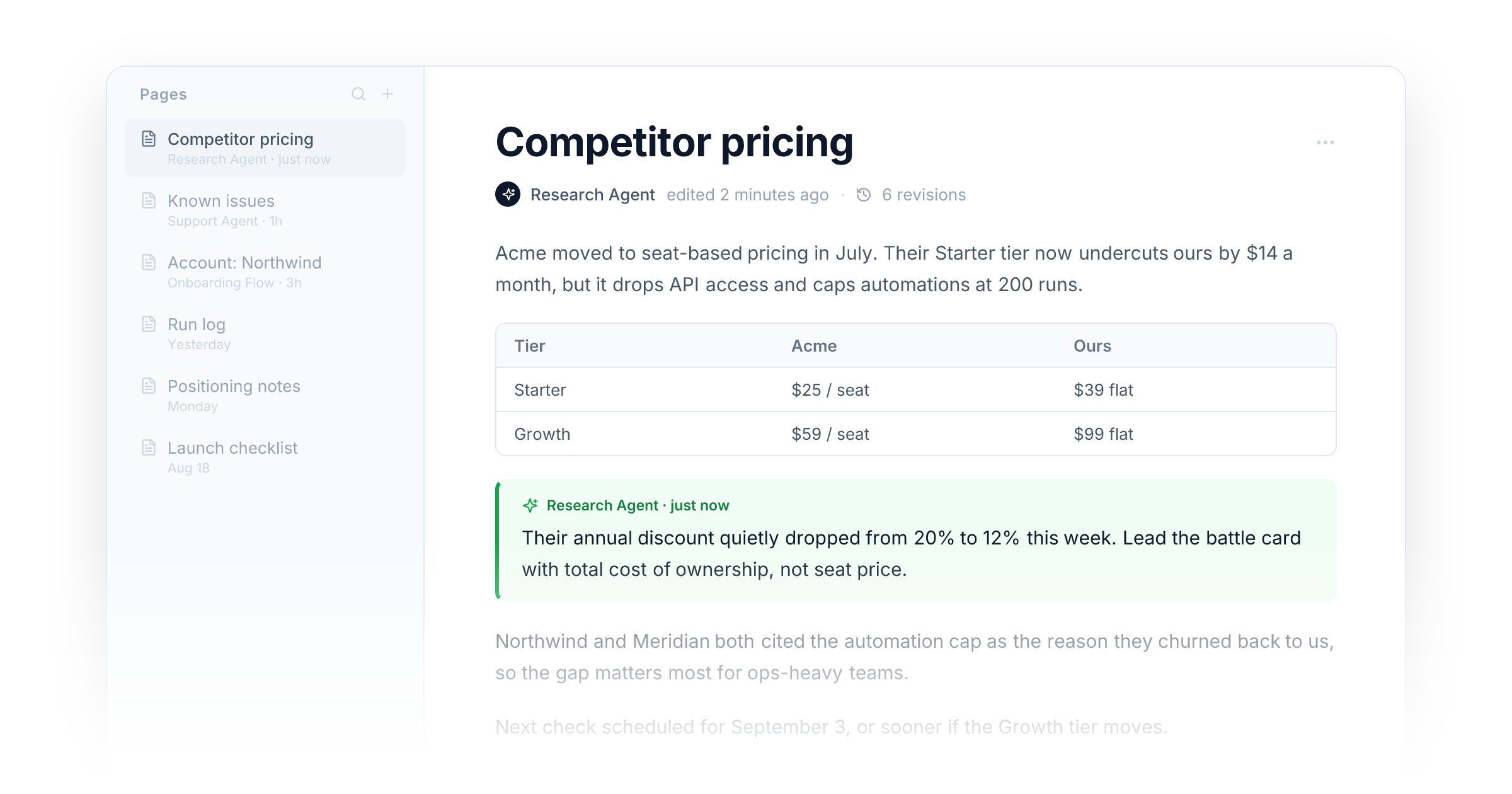
Until today, a Notebook was whatever you put in it. You uploaded the docs, pasted the links, wrote the instructions, and from that moment on it just sat there. Your Agents read from it, but nothing they did, and nothing your customers did, ever made it back in. The day you set it up was the smartest it would ever be.
Meanwhile the actual intelligence was leaking out the sides. Picture yesterday afternoon: your research Agent spent ten minutes pulling apart a competitor's pricing page and produced something genuinely useful. Then the chat ended. This morning you opened your writing Agent to continue working, and the first thing you did was scroll back through yesterday's conversation, copy the good part, paste it, and type "use this as context." Be honest: your clipboard has been the memory layer this whole time.
Today, Notebooks come alive. Agents can now write their work into Notebook pages: durable, readable documents that live on the Notebook itself. The research Agent finishes its analysis and saves a "Competitor pricing" page. Tomorrow, the writing Agent sees that page sitting in its Notebook, reads it, and drafts its strategy. Nobody pasted anything. The Notebook is smarter tonight than it was this morning, and it will be smarter again tomorrow.
Every Agent on the Notebook shares one memory
Each Agent attached to a Notebook now sees an index of its pages, the way you'd glance at a folder of docs before starting work. It can open any page in full, search across all of them when the index isn't enough, and write new findings back, either appending to an existing page or starting a fresh one.
That last part is what makes it collaboration rather than storage. One Agent's output is the next Agent's input, automatically. A support Agent logs recurring complaints to a "Known issues" page; your product Agent reads it when you ask what to prioritize. Your onboarding Flow appends every new customer's quirks to an account page; the account Agent already knows them on the first message. The handoff you used to do by hand just happens.
A memory bespoke to every customer
Because the Notebook grows out of real usage, no two end up alike. Two workspaces can start from the same template and, six months in, hold completely different memories: one shaped by sales research, the other by support tickets, each an exact record of how that team actually works with its Agents.
The same is true one level down. On your Portal, every customer already has their own private Notebook, and Agents write there too. Each customer's pages grow out of their own conversations: their goals, their history, their quirks. The tenth conversation with your Agent feels different from the first, because by then the Agent is working from a memory that only that customer could have produced. That is not a setting you configure. It is just what happens when memory follows usage.
You see every word they write
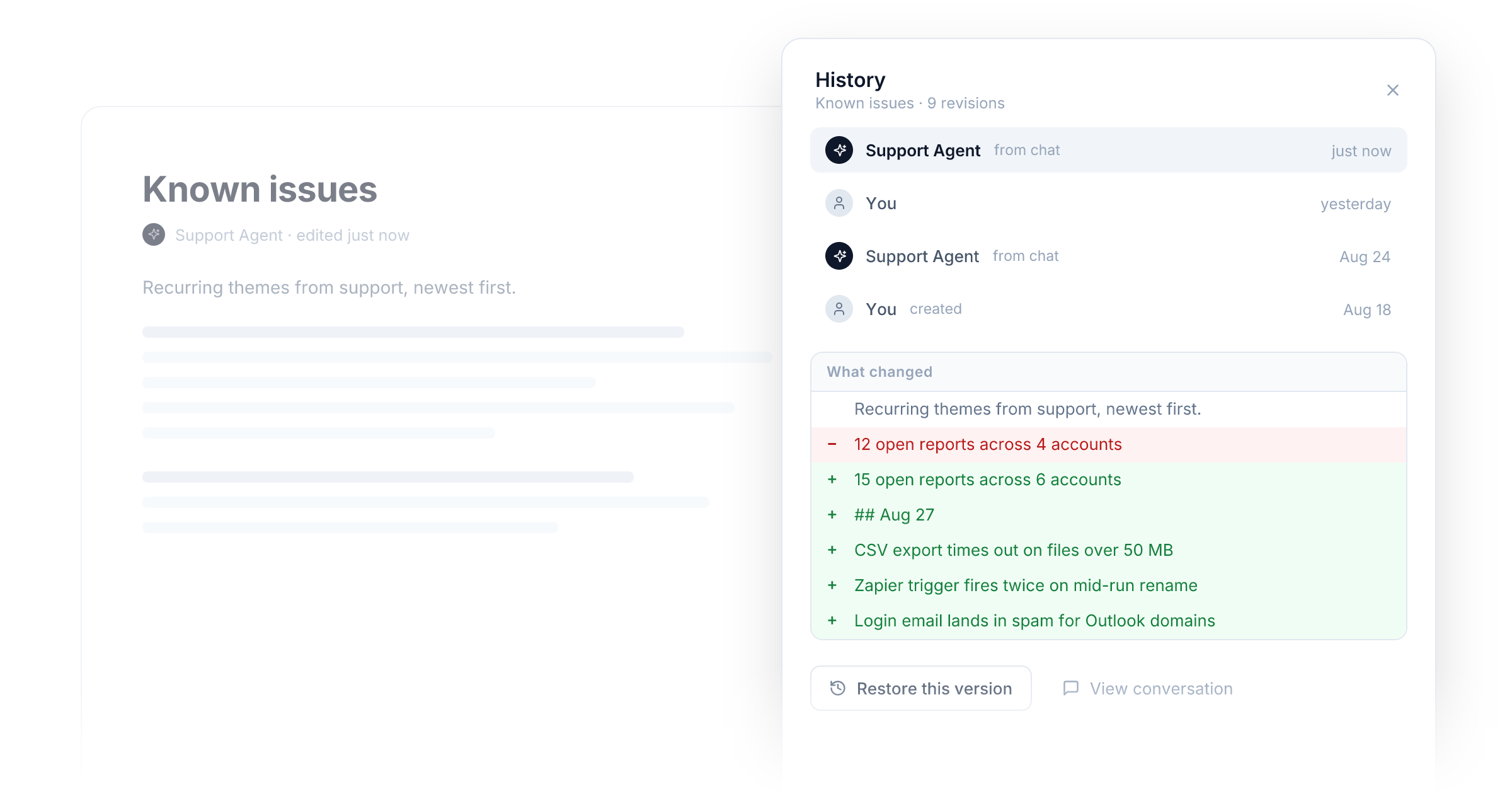
Pages come with a full paper trail. Every save is a revision: open the history on any page and you get a side-by-side diff of exactly what changed, who changed it (you or an Agent, with a link back to the conversation where it happened), and a one-click revert if you don't like it.
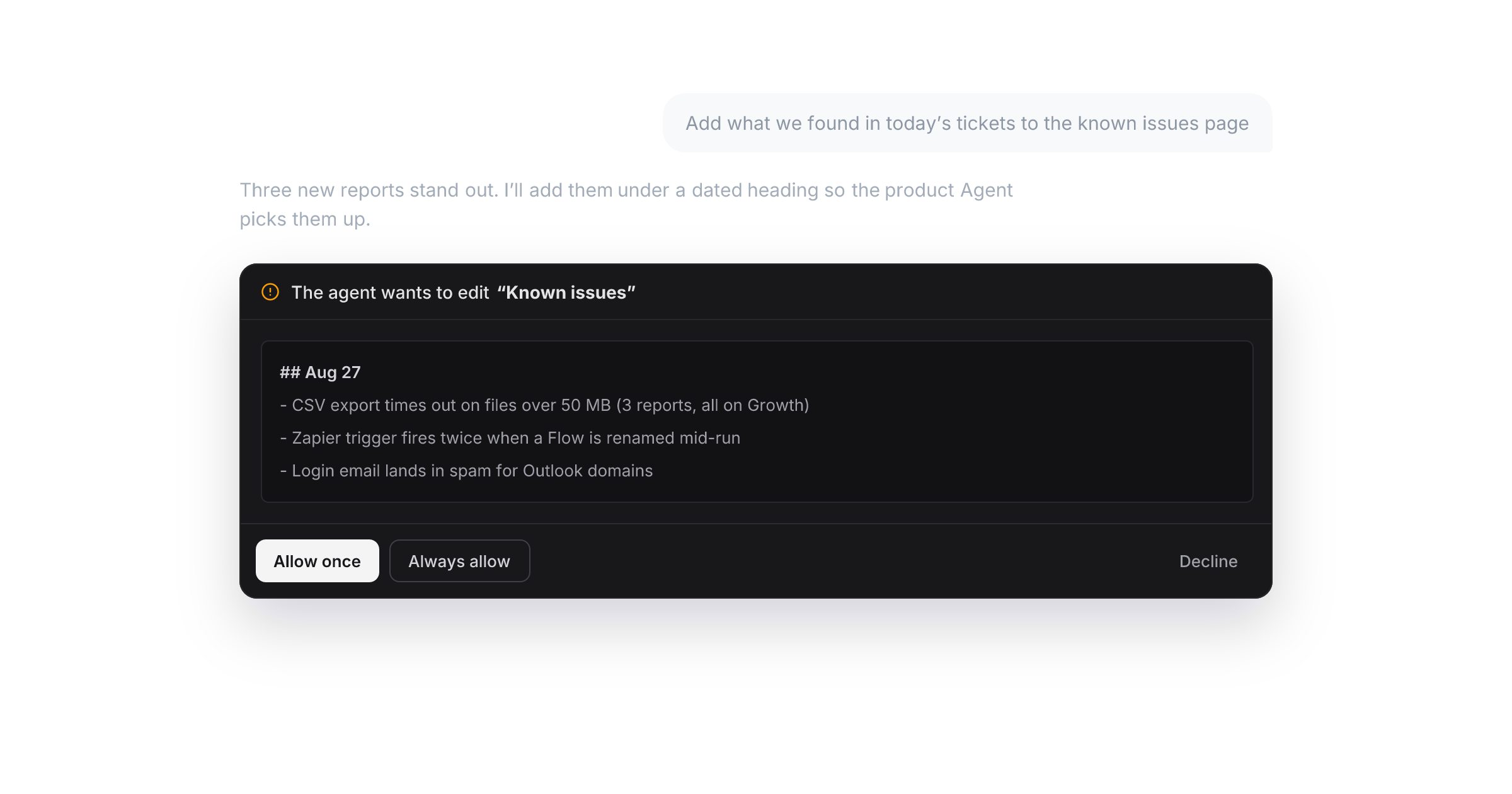
You control the pen, too. By default, when an Agent wants to write to a page mid-chat, you get a simple card: Allow once, Always allow, or Decline. Teams that want tighter control can turn on review mode, where every agent write lands in an approval inbox before it touches the page. And if you trust your setup, switch to Always allow and let them work.
A real editor, not a log file
Pages aren't a hidden data store. The Notebook is now a proper writing surface where you work alongside your Agents: a clean document editor with a slash menu, tables, and page-to-page links with backlinks. Drag a file onto a page and it's attached right there, feeding the Notebook's knowledge like any other source. Templates give Agents a consistent shape to fill in, the same trick that makes a well-run ticket queue readable.
Edit an Agent's page, and the next Agent to read it gets your corrections. It's a two-way document, not a log.
Notebook Pages are live today on every plan. Open any Notebook and the pages workspace is the first thing you'll see.
Improvements
- Memories: A new Memories workspace under Brain lets you browse, pin, and prune everything your Agents have remembered, and Agents can now search memories on demand instead of relying only on automatic recall.
- Memories: After a run finishes, Agents automatically write a short episodic summary of what happened, so context carries across conversations without you saving anything.
- Notebooks: Import pages from Google Drive, Notion, and Linear, with hourly background sync for connected sources.
- Notebooks: Import a Claude skill folder from GitHub and it becomes a ready-to-use page subtree, scripts and all.
New integrations323
Datadog MCP
Ahrefs MCP
Better Stack MCP
Neon MCP
Resend MCP
Elastic Email
Supermemory
Bitly
ContentStudio
Lettr
Zernio MCP
urlscan.io
Smartlead
Railway MCP
Zoom Team Chat
Cashfree MCP
Vercel MCP
JoggAI
Quo
Siteleaf
Fleetio
Canva MCP
ClickHouse MCP
Supabase MCP
FullStory
Modem
CallOnTheGo
eSignatures
PageVitals
FuseDesk
OneUp
Pinterest
Bland AI
Blooio
SureContact
Check Cherry
Printify
Arize AX
CompanyCam
Mighty Networks
Maildroppa
Adtraction
Lyzr
PandaDoc MCP
Runway
Adafruit IO
Box MCP
CertSeal
- and 275 more