
Intelligent syncing for Knowledgebases
A support Agent is only as good as the day its sources were last updated. You change a price, retire a feature, rewrite a help article, and the Agent keeps quoting the old version until someone remembers to re-upload the file. Most teams find out from a customer.
Your Knowledgebase can now keep itself current. Every source that lives somewhere else, a website, a Google Drive folder, or a Notion database, can be put on a schedule. FormWise checks it again on that schedule, brings in what is new or changed, and drops what was removed. Your Agents and Flows read the Knowledgebase at run time, so the next answer uses the new version. Nothing to re-upload, nothing to republish.
Pick the schedule that matches how often things change
Every synced source has a schedule: Hourly, Daily, Weekly, or Manual. A help center that changes every week can be checked weekly. A pricing page or a status page can be checked every hour. Set it once when you add the source and change it any time from the source's row.
Checks are cheap by design. Each run looks for real changes before it reads anything, so a page or file that has not moved costs nothing. Only new and changed content is indexed and charged. The estimate you see when you set a schedule is the most it could ever cost if everything changed every time; the real number is usually a fraction of that.
Bring in your whole website, not one page at a time
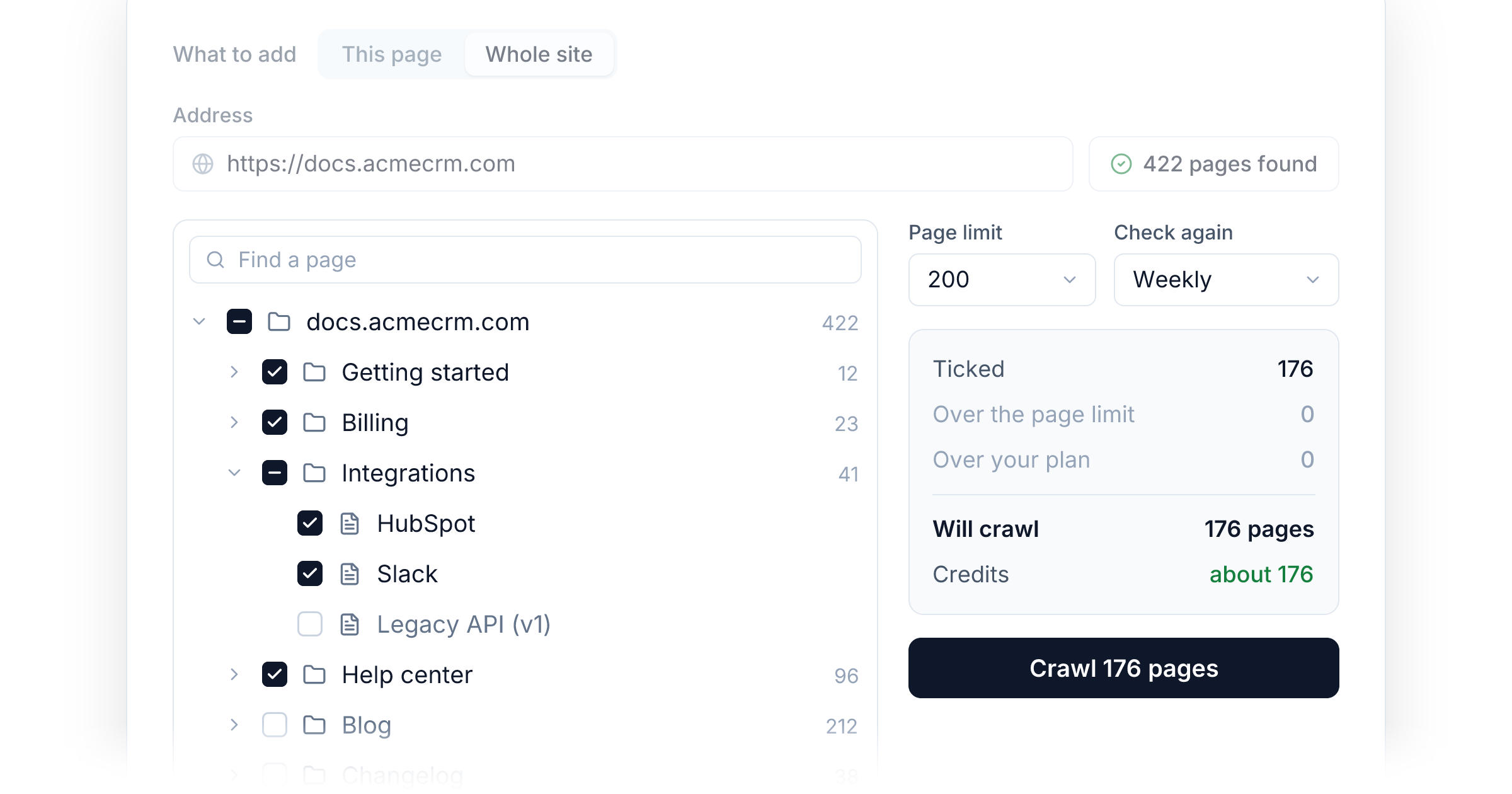
The site you already maintain is the source your support Agent should be reading. Add a website to a Knowledgebase, enter your site, a section like /docs, or a sitemap, and click Check site. FormWise shows every page it found as a tree, with nothing written yet. Tick the sections you want. Ticking a section includes everything under it, including pages you publish later, so a new help article is picked up on the next check without anyone touching FormWise.
Each page becomes a File your Agents can search and cite. A page you take down disappears from the Knowledgebase on the next check, so the Agent stops pointing customers at articles that no longer exist.
You find out when a source stops updating
A sync that breaks is worse than no sync, because everything looks fine while the answers drift. When a Drive folder, a Notion database, or a site stops syncing, everything it already brought in stays in place, and you hear about it in three places: the source's row says what went wrong, the sync shows under Needs you on the new Syncs board, and you get one email the moment a sync that was working starts failing. It does not nag you again until it is fixed.
Every sync on one board
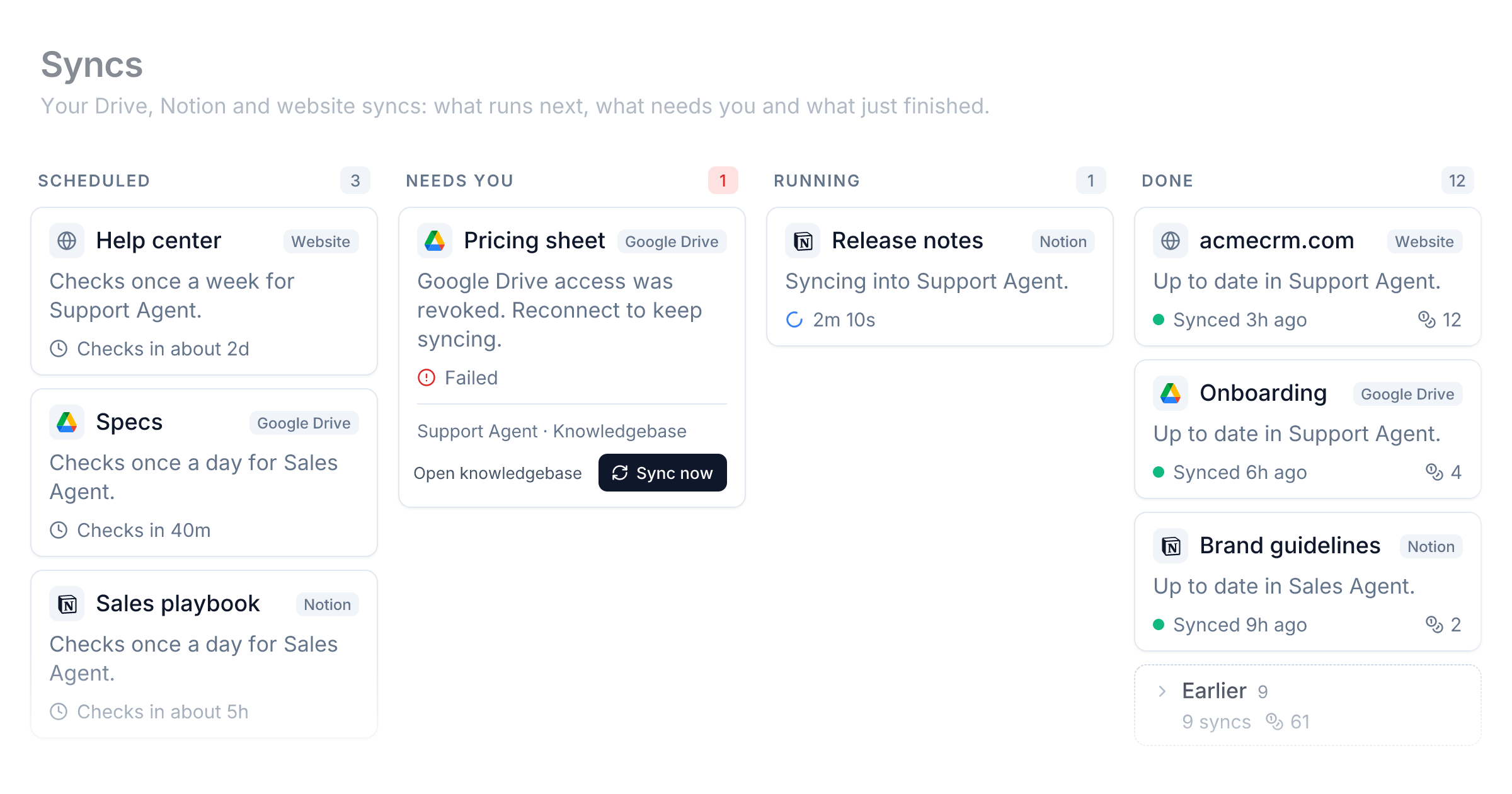
Open Knowledgebase, then Syncs, and every scheduled source in your workspace is in one place: what runs next, what is running, what needs you, and what just finished. Any sync can be run right now from its card.
Website crawls are in the Add menu of any Knowledgebase under Websites, then Whole site. Schedules apply to Google Drive and Notion syncs too. All of it also works over the API and MCP, so your assistant can set up a crawl for you.
Improvements
- Environment: Keep API keys out of your Flows. Save a secret once in Settings, then Environment, and reference it as
{{env.NAME}}from Webhook, API Request, and MCP steps. Values are encrypted, never shown again, and never appear in run logs. - Connectors: Add your own MCP server once on the Connectors page and pick it from any Agent step. Edit the address or token in one place and every step that uses it follows.
- Sidebar: Star the Agents, Flows, Apps, Suites, Portals, and Knowledgebases you open most. They sit in a Starred section at the top of your sidebar, in the order you drag them into.
- Sidebar: Hover any row for a short explanation of what that page is for, with a link to its guide in the docs.
- Knowledgebases: Removing a File over the API or MCP is now one call, with
delete_source. - Knowledgebases: Large Drive folders sync more predictably. Each run picks up the oldest unchecked files first and a sync no longer deletes synced files past the first page of results.
- Credits: Agents on Claude models cost less per conversation. The instructions and tools an Agent sends with every step are now cached, so a multi-step run reads them at the cached rate instead of paying the full input price each time. Long tool loops see the biggest drop, and you do not need to change anything.
Fixes
- Flows: Node settings no longer go blank the first time a panel opens before its node has loaded.
- Flows: Webhook responses are scrubbed before they are logged, so a service that echoes a request cannot leak a secret into History.
New integrations44
Ambiguous MCP
HighLevel Location
MongoDB
freee
Dynatrace
Surf
SmartHR
LiveChat
Aha!
Notra
Imply Polaris
Freshsales
Quire
HaloPSA
Pivot
MotherDuck MCP
MiniMax
Judge.me
Google AdSense
Oboard
Replay MCP
eBay
Microsoft PowerPoint
Threads
Money Forward
Microsoft Word
Recraft MCP
dbt Cloud
Memelord MCP
LimaData
CapSolver
ProductNow MCP
Microsoft Advertising
LLM API
mailfloss
Cartesia
TryFundable
DeepL MCP
Crunchbase
Memelord
Firmable
cve.now MCP
Ignav Flights MCP
Weaviate MCP